How to Get Notified When Your Mac's Internet Drops
macOS doesn't tell you when your internet drops. The Wi-Fi icon only shows your connection to the router, so it stays full while the internet behind it is gone, and you find out when a page won't load or a call freezes. Here's how to get told the moment it happens instead.
Why your Mac stays quiet
The Wi-Fi icon checks one thing: that your Mac has joined a network. It doesn't check whether that network can reach the internet. When your provider has an outage, your modem needs a restart, or a hotel network is waiting for you to log in, the icon looks exactly the same. Nothing in macOS sends a notification for any of those.
To get an alert, something has to keep checking that the internet actually answers, and tell you when it stops.
Get a notification with NetCheck (free)
NetCheck is a free menu bar app that does exactly that.
- Install NetCheck from the Mac App Store. A dot appears in your menu bar: green when the internet answers, grey when it doesn't.
- Allow notifications when NetCheck asks.
- Choose how often it checks in Preferences, from every 5 seconds to every 5 minutes.
From then on, NetCheck sends a Mac notification the moment your internet drops, and another when it comes back. The "No Internet" notification has a button that opens your Wi-Fi settings, and clicking the dot shows the Network Path Diagram, so you can see whether the break is your Wi-Fi or the connection beyond the router.
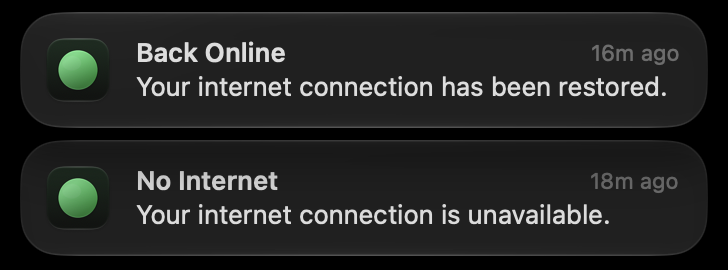
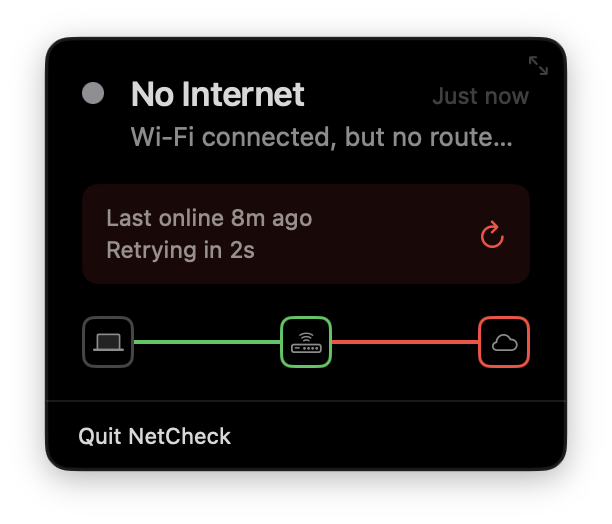
No account, no ads and no Dock icon. It can open automatically when you log in, if you turn that on.
Keep a record of every drop
If the drops keep coming and you want proof for your provider, NetCheck Pro ($14.99, one-time, no subscription) adds Network History: a timestamped log of every drop and reconnect, with a reliability score and CSV export.
Get told on your phone, too
A notification on your Mac only helps when you're at your Mac. If you want to know when a Mac at home or in the office goes offline while you're away, see how to get an iPhone alert when your Mac goes offline.
NetCheck is free on the Mac App Store, with an optional one-time Pro upgrade.
Get NetCheck See all featuresFrequently Asked Questions
Can macOS notify me about a dropped connection on its own?
No. macOS shows the Wi-Fi icon and a "No Internet Connection" note in Wi-Fi settings, but it doesn't send a notification when the internet drops.
Will it notify me when I'm on a hotel or café network that needs a login?
Yes. NetCheck checks that the internet itself answers, so a network waiting for you to log in shows as offline even though Wi-Fi is connected.